Features
See how FleetView works, screen by screen.
Every picture on this page is the real app, with example data. This page starts with the broker’s rate confirmation (rate con) and goes to the invoice. Then come your DOT dates, roadside stops and proof links.
Book a load
From rate con to your driver’s phone
Send FleetView the broker’s rate con as a PDF or a photo, or paste the email. FleetView AI reads it and fills in the stops, times, rate and reference numbers, and you confirm them. Then one press books the load and puts it on your driver’s phone.
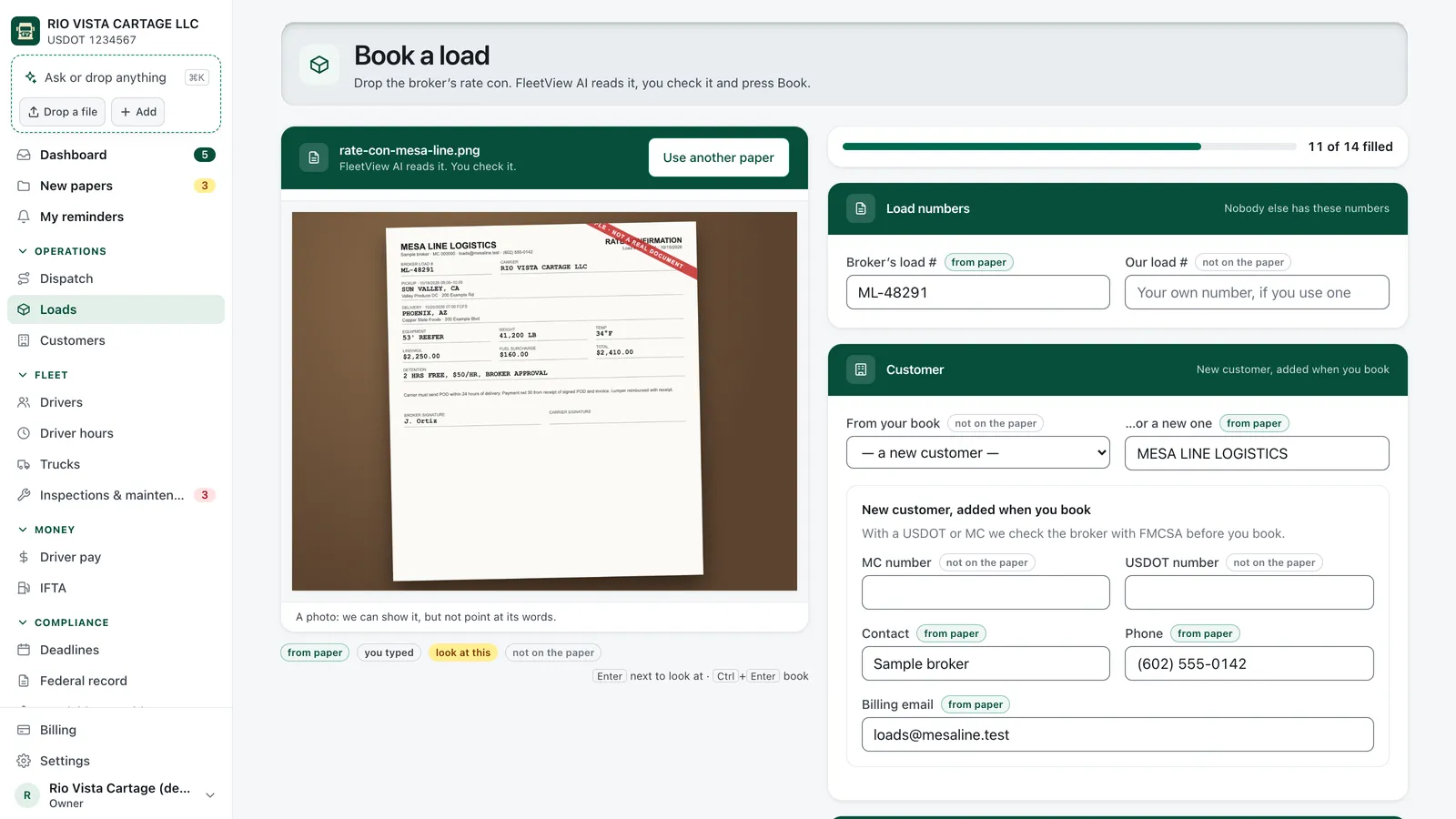
Each line shows where it came from
The mark says from the rate con, typed by you, or not on the paper. Click a line, and the rate con lights up where it was read. Nothing is saved until you book.
Give it to a driver who can take it
You see which drivers are free and allowed to drive that day. FleetView will not let you give a load to a driver whose medical card or CDL has expired, or ends before the load is done.
Send it now, or later
Book the load and send it to your driver in one step, or book it now and send it later. If the email to your driver does not go through, the load stays booked and you get a link to send him.
The broker’s FMCSA status, on the booking screen
FleetView looks up the broker’s authority on the FMCSA record and shows the date it checked. If the result is Stop, you must write a reason to book anyway, and the reason is saved with the load.
Free hours and hourly rate, saved on the load
FleetView keeps them from the rate con and uses them later to work out detention. You never open the PDF to look them up.
Multi-stop loads, no extra work
Pickups, deliveries, drops and hooks in order, each with its own time window and reference numbers. Find any load by the broker’s load number.
Invoices
Detention and lumper charges on the invoice
The arrive and leave times from your driver’s phone, and the amount on the lumper receipt photo, land on the load. You choose which charges go on the invoice.
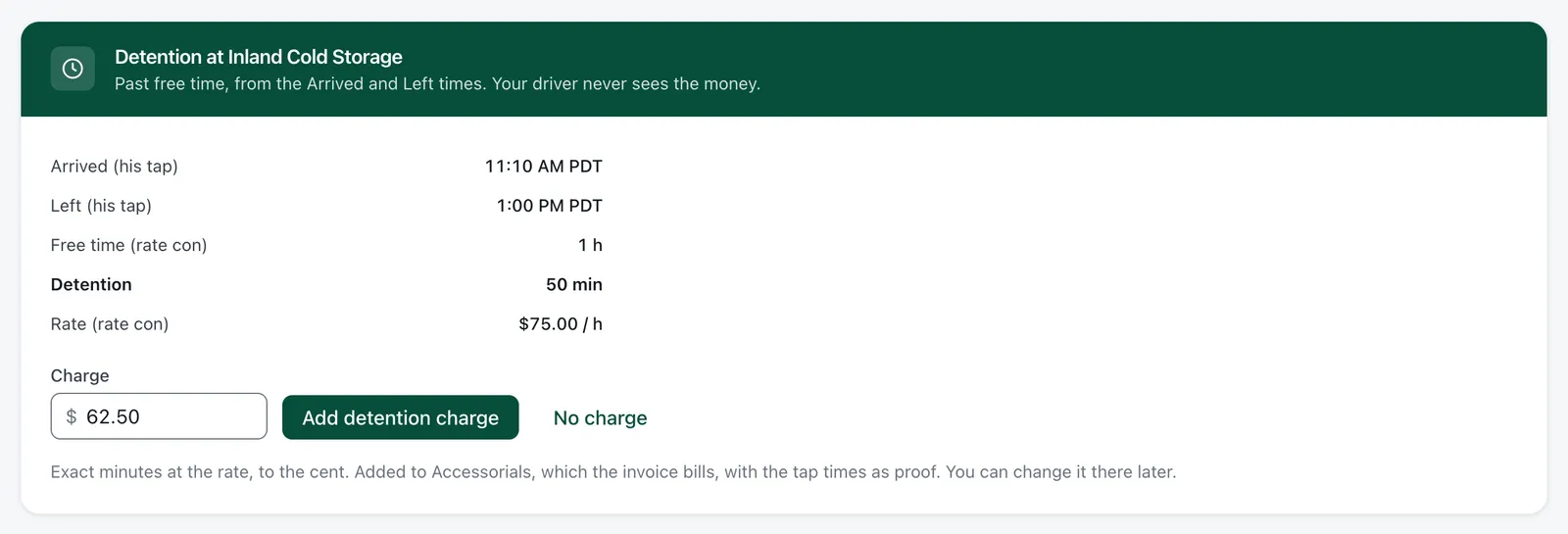
Detention, worked out from arrive and leave
The load shows when your driver arrived and left, and the minutes past the free time. Press Add detention charge or No charge. The rate con’s terms come first. Without them, FleetView uses $50 an hour after 2 free hours, and you can change that for each customer.
The lumper charge, from a photo
Your driver takes a photo of the lumper receipt, and the amount comes in from the photo. You press Add lumper charge or No charge. Each receipt can be added only once.
The POD the same day, not next week
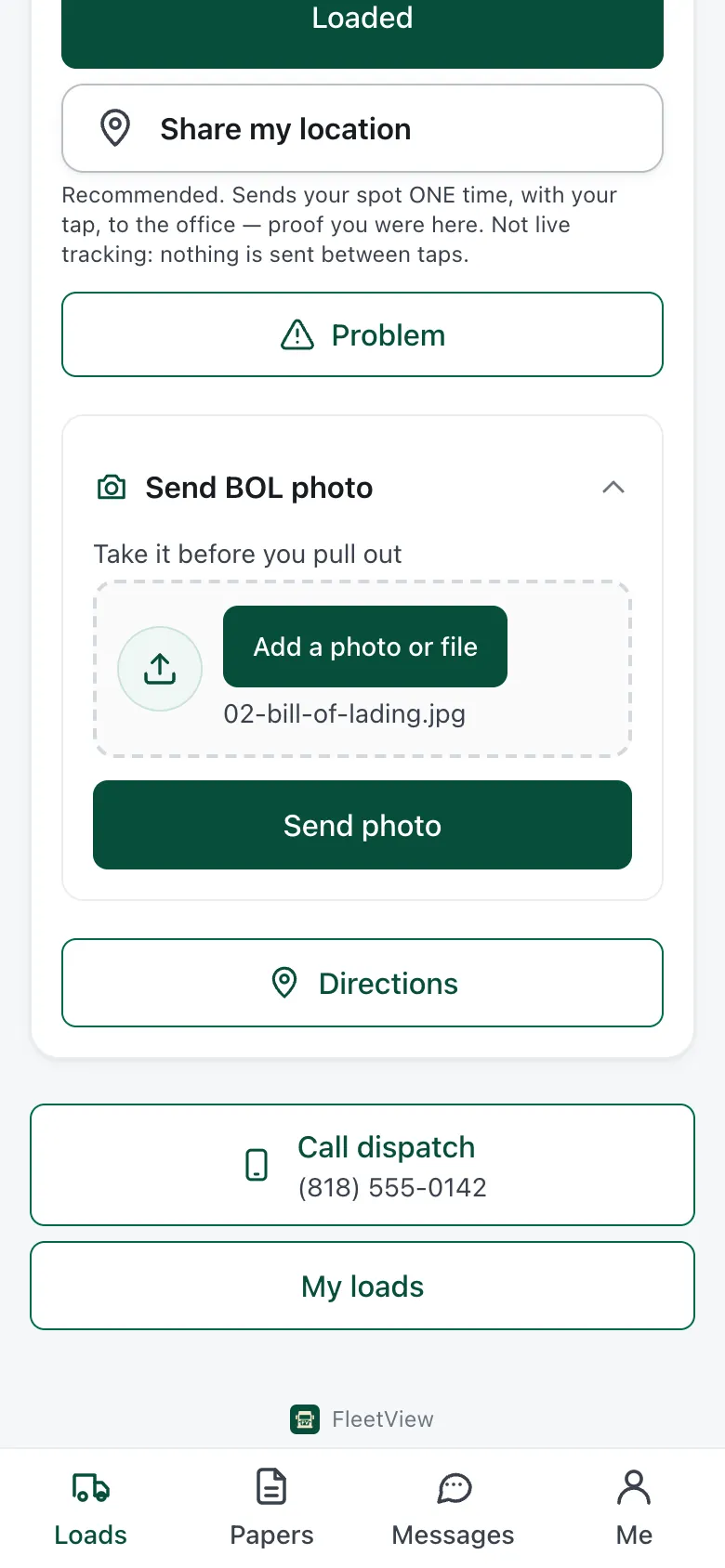
Your driver sends the POD from the dock. The receiver can also sign on your driver’s phone, with a printed name and the time. You check it and bill the same day.
One PDF for the broker
The invoice, rate con, BOL, POD, lumper receipts and the receiver’s signature, in one file. You download it, copy the ready-made email text, send it yourself, and mark the load invoiced.
Know who still owes you
Each load shows where the money is: invoiced, sent to factor, funded, paid, short paid or in dispute. You see how many days each invoice has been open.
And the office work after the load
- Pay back your driver’s expenses
- Tolls, scales, parking, repairs. Your driver sends a photo of the receipt. You check the amount, and it goes on your driver’s next pay statement.
- IFTA totals by state
- Your drivers’ fuel receipts come in for you to add, and you type the miles for each state. If a state’s tax rate is missing, FleetView tells you instead of counting it as $0.
- Driver pay statements
- Pay by the mile, by percentage, by the hour or a flat amount. A statement stays a draft until you mark it paid, then it locks. It is not a payroll service.
Dispatch and tracking
Every stop on your board, and a tracking link for the broker
Each button your driver presses shows up on your Dispatch board with the time. The broker’s tracking link shows the same stops, and nothing else.
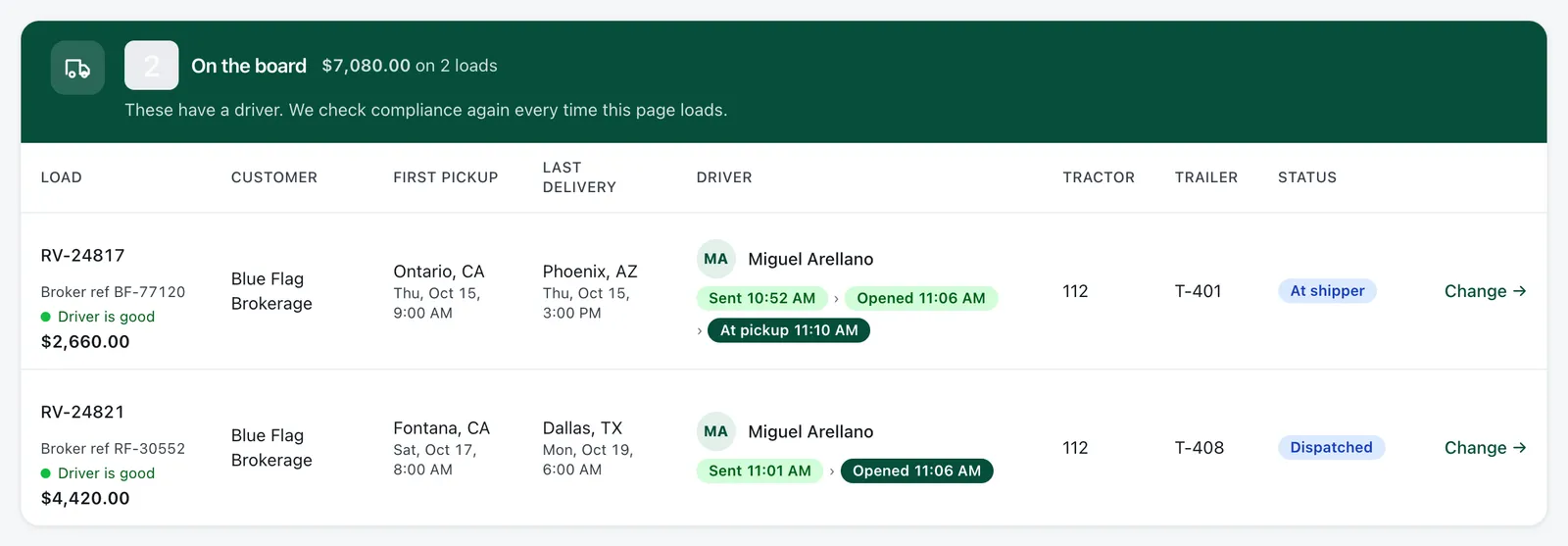
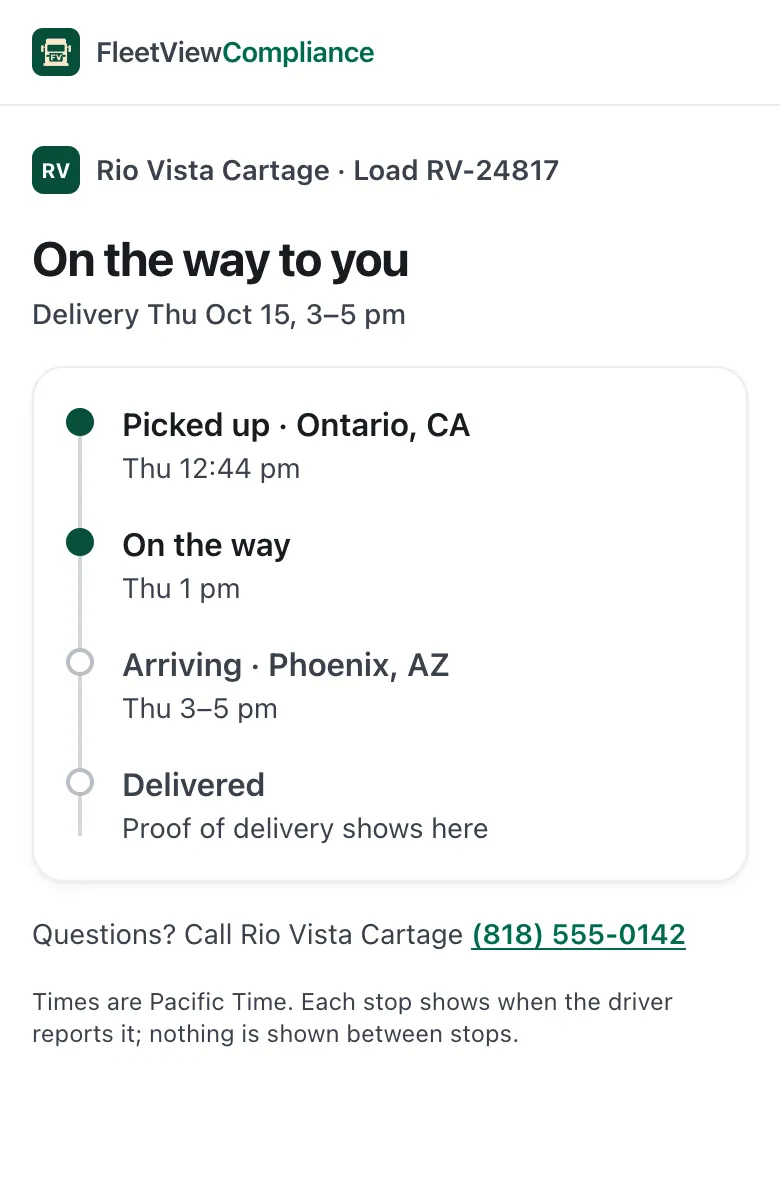
Every step, as it happens
Your board moves through Sent, Opened, At pickup, Loaded, Delivered and POD in.
Late, with the reason and a new ETA
Your driver picks how late and why. You see “Late · ETA 3:40 PM (Traffic)”. If something goes wrong, your driver sends a problem report with a photo, and you mark it Handled.
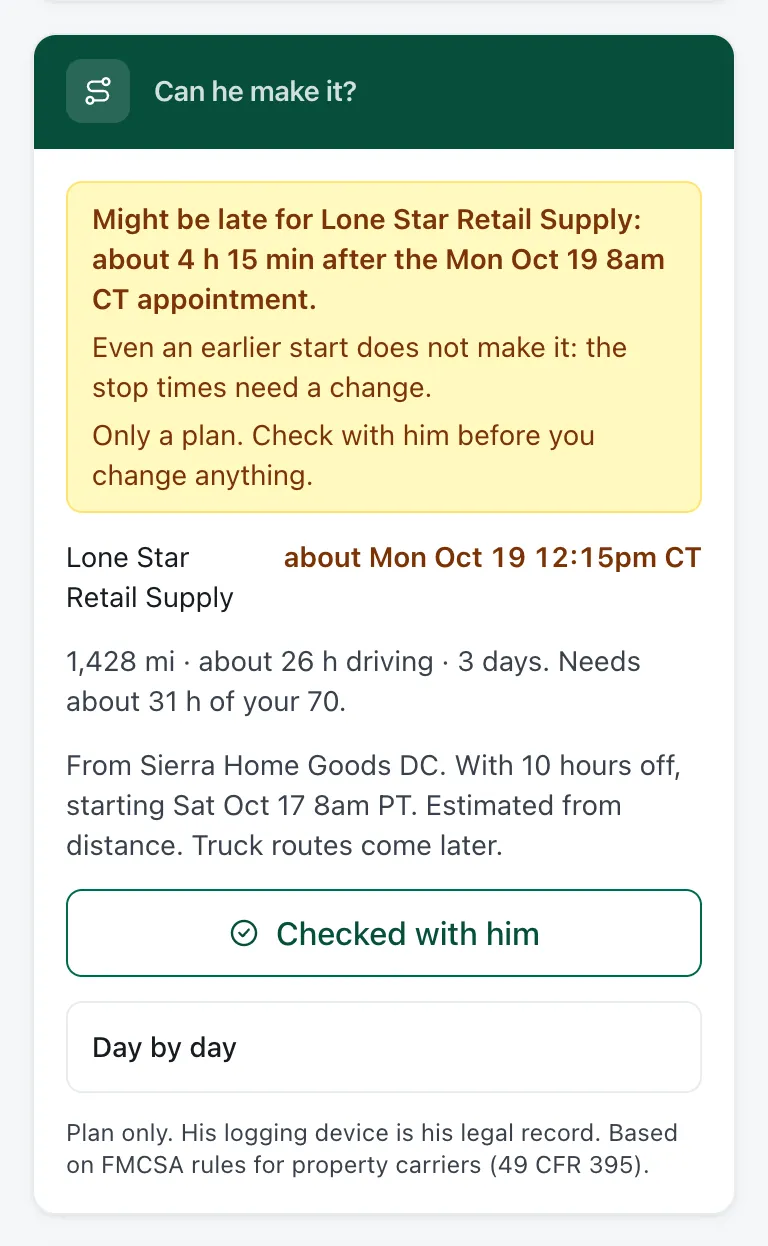
Can your driver make the appointment?
A rough trip plan, from the distance and your driver’s hours left, shows whether the stop times work. Check with your driver before you change anything.
Messages kept with the load
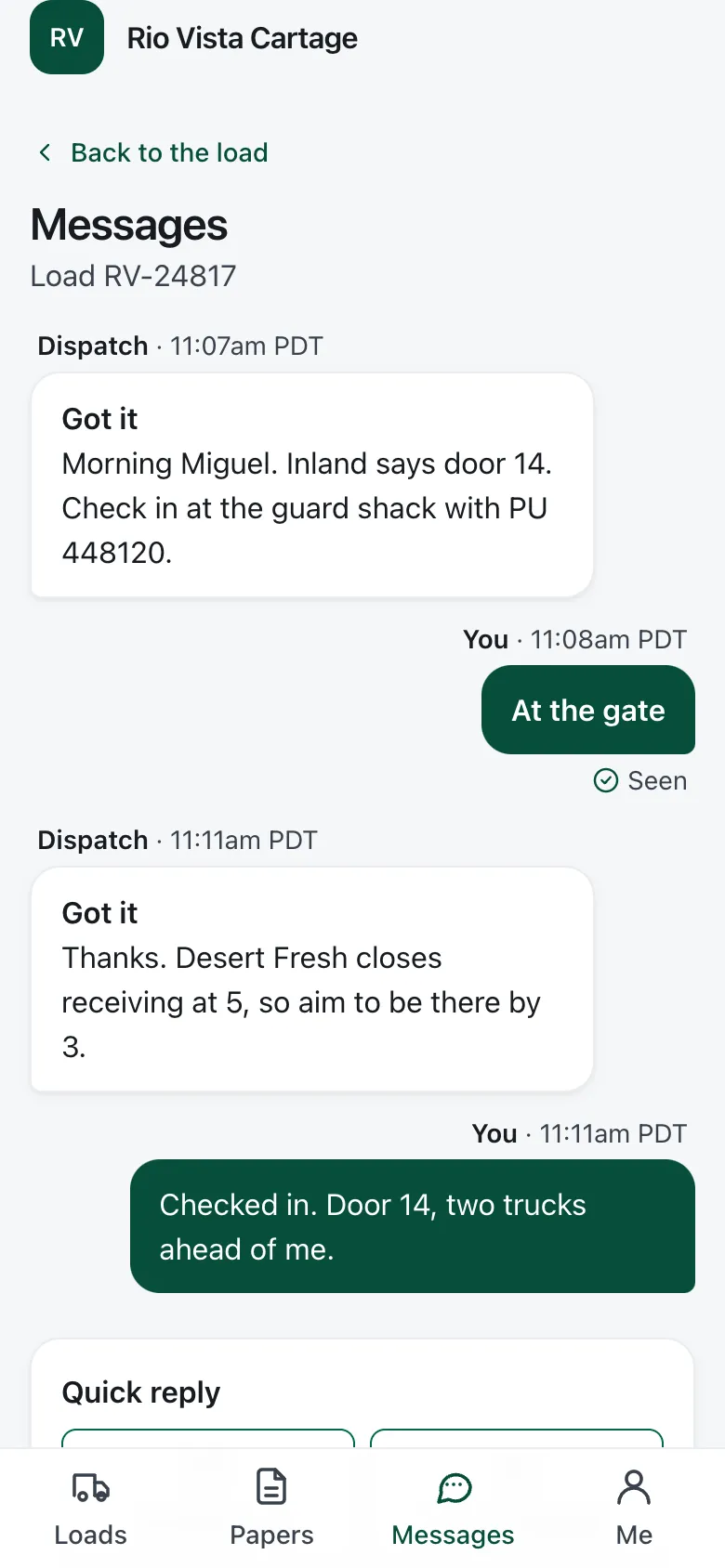
Each message stays on its load, and you see when your driver read it. The lock screen shows only “Message about load 1042”, never the words.
Alerts on your driver’s phone
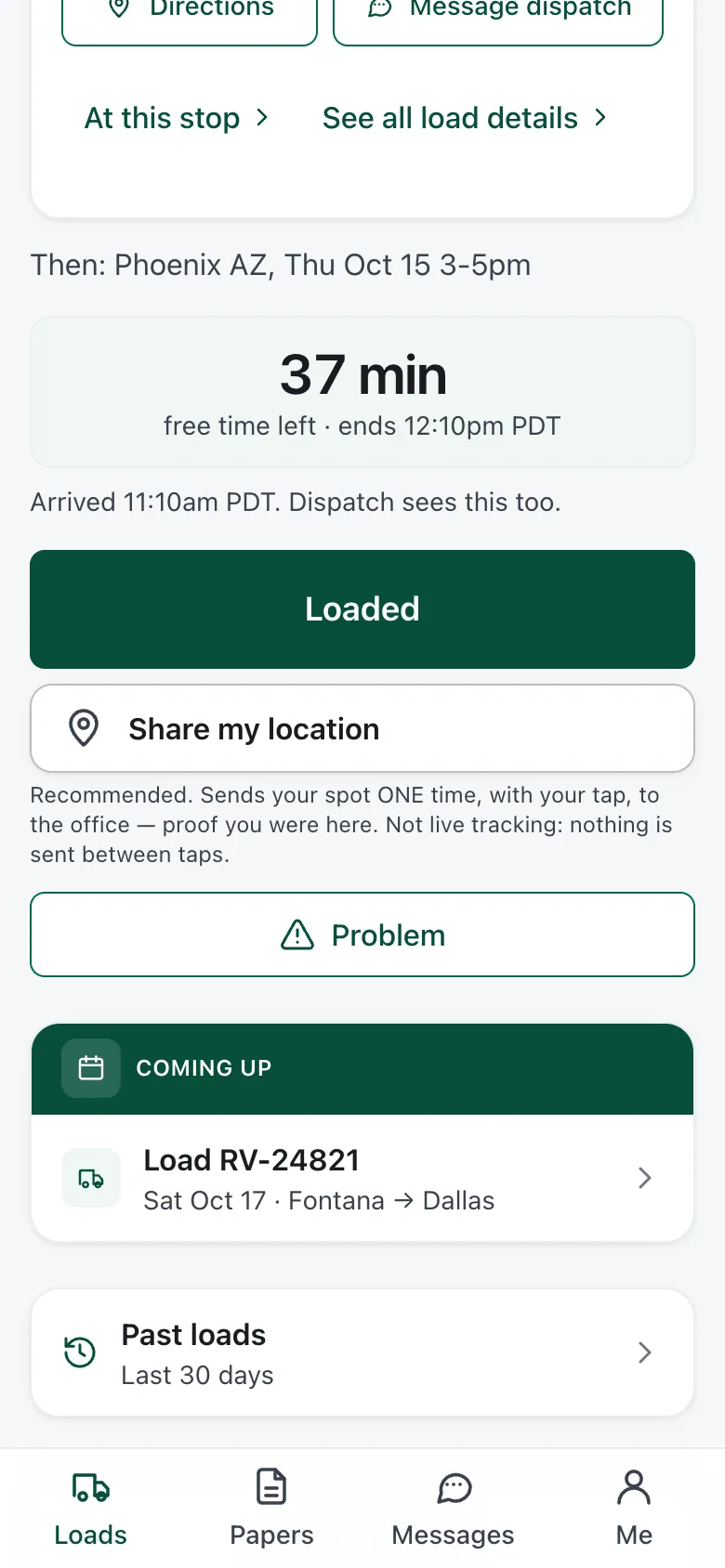
Your driver gets an alert for a new load, a changed time or address, and when the free time at the dock is running out. He adds the app to his home screen once and allows alerts.
What the broker’s link shows
The broker sees each stop as your driver reaches it, by city and state. No map, no driver name, no money. The link stops working 3 days after delivery, or when you turn it off.
Broker emails only when it matters
Picked up, running late, arrived, delivered. Several changes go out in one email, not one email for each step. The broker can unsubscribe with one click, and you can turn the emails off.
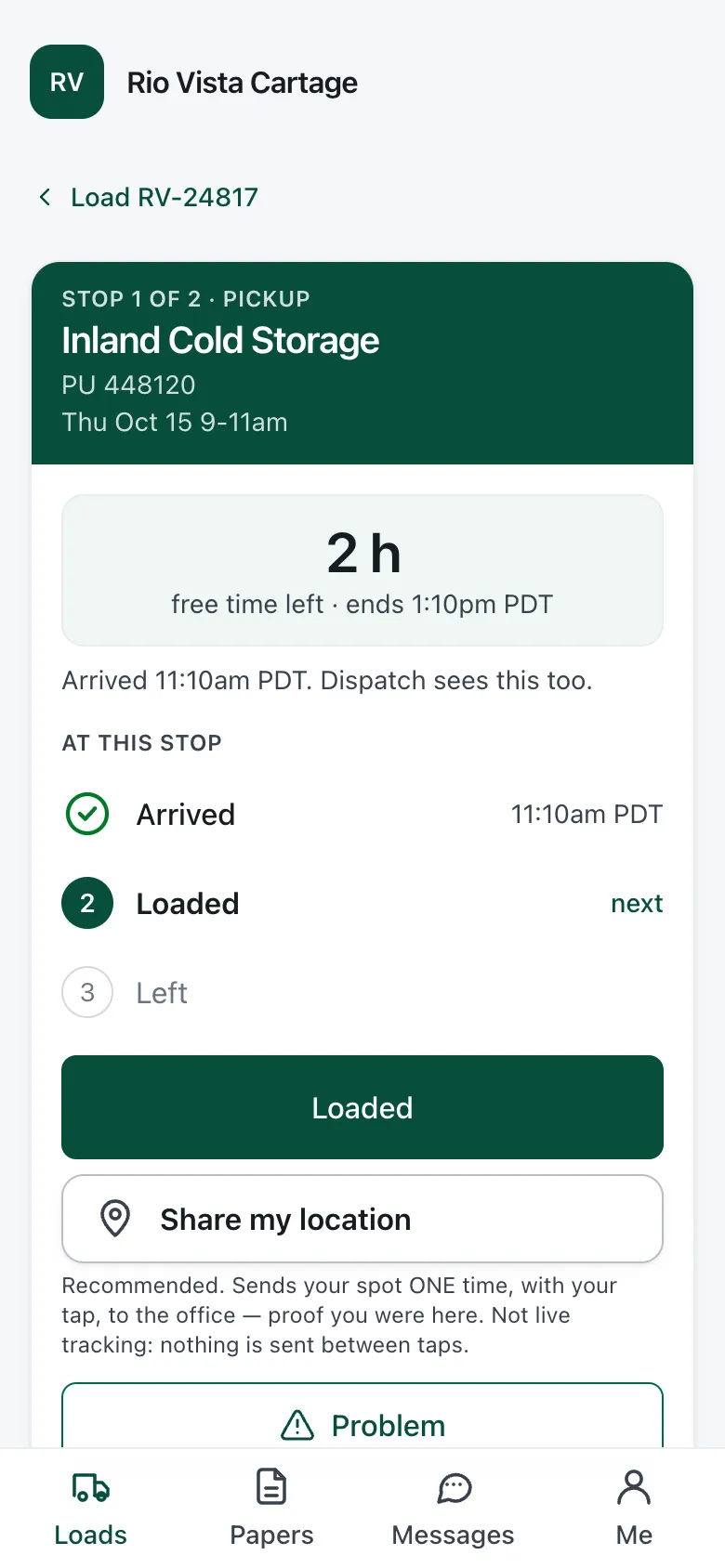
The driver app
Four tabs and one big button
The driver app runs on your driver’s own phone, with four tabs: Loads, Papers, Messages and Me.
Your driver presses I’m here, Loaded, then Left. The next step is always the biggest button.
Sign-in with a code, then a face or a fingerprint
You invite your driver by text, email or a link. Your driver signs in once with a one-time code, then uses Face ID or a fingerprint, and stays signed in for 90 days.
Works with no signal
When your driver has no signal, his button presses and photos wait on the phone and send when the signal comes back. You still see the real time, marked “Sent late · phone time”.
The right photo at each stop
At each stop, the driver app asks for the paper that goes with it: the BOL at a pickup, the POD at a delivery. Your driver does not have to remember which one.
Money and test results are blocked, not hidden
Rates, invoices, pay, and drug and alcohol results are blocked in the database, not just hidden on the screen. Your driver’s phone never receives them.
Every phone your driver uses, listed
See which phones your driver is signed in on, and sign one out. When a driver leaves your company, one step signs him out everywhere.
DOT dates and your FMCSA record
Your deadline list and your FMCSA record
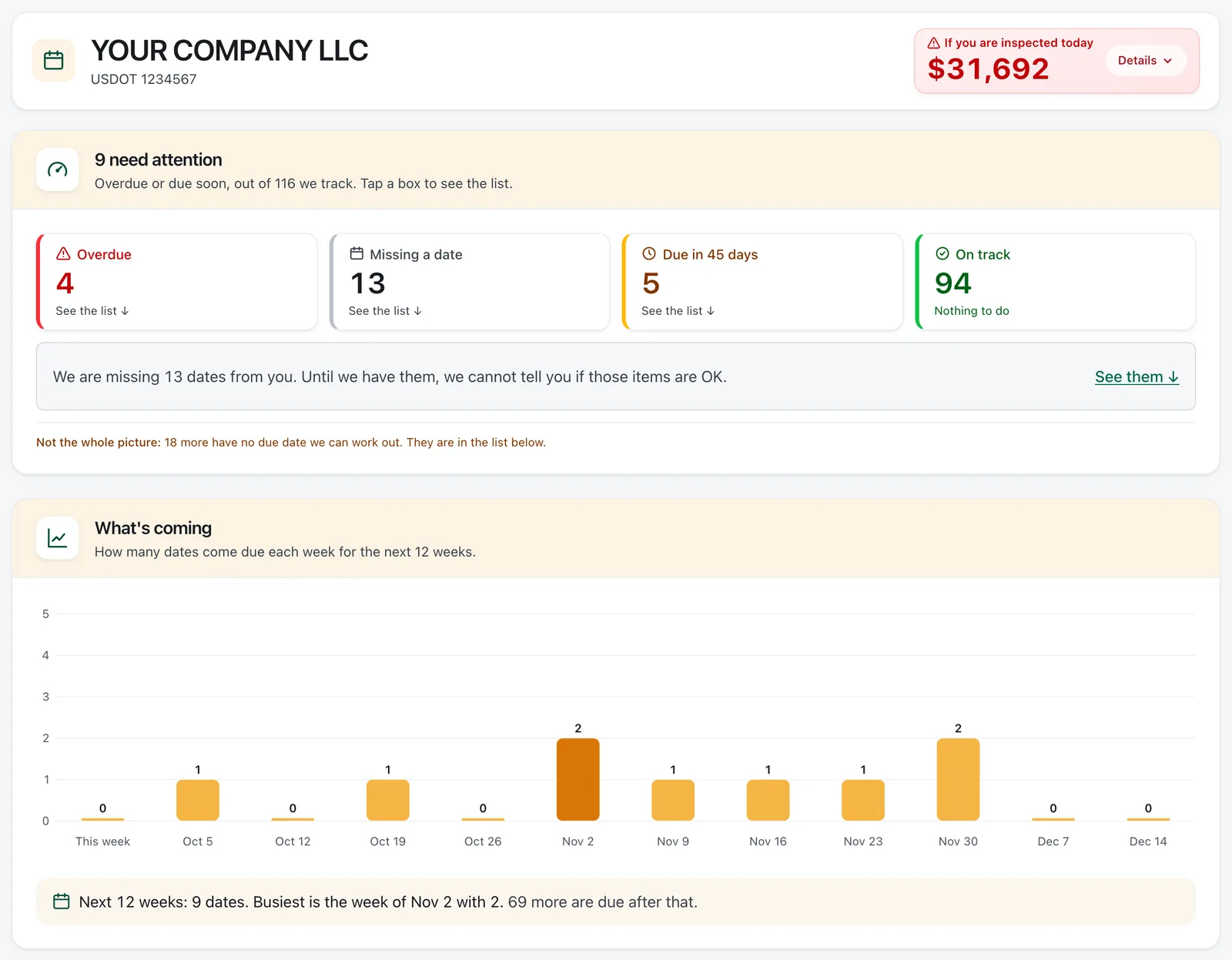
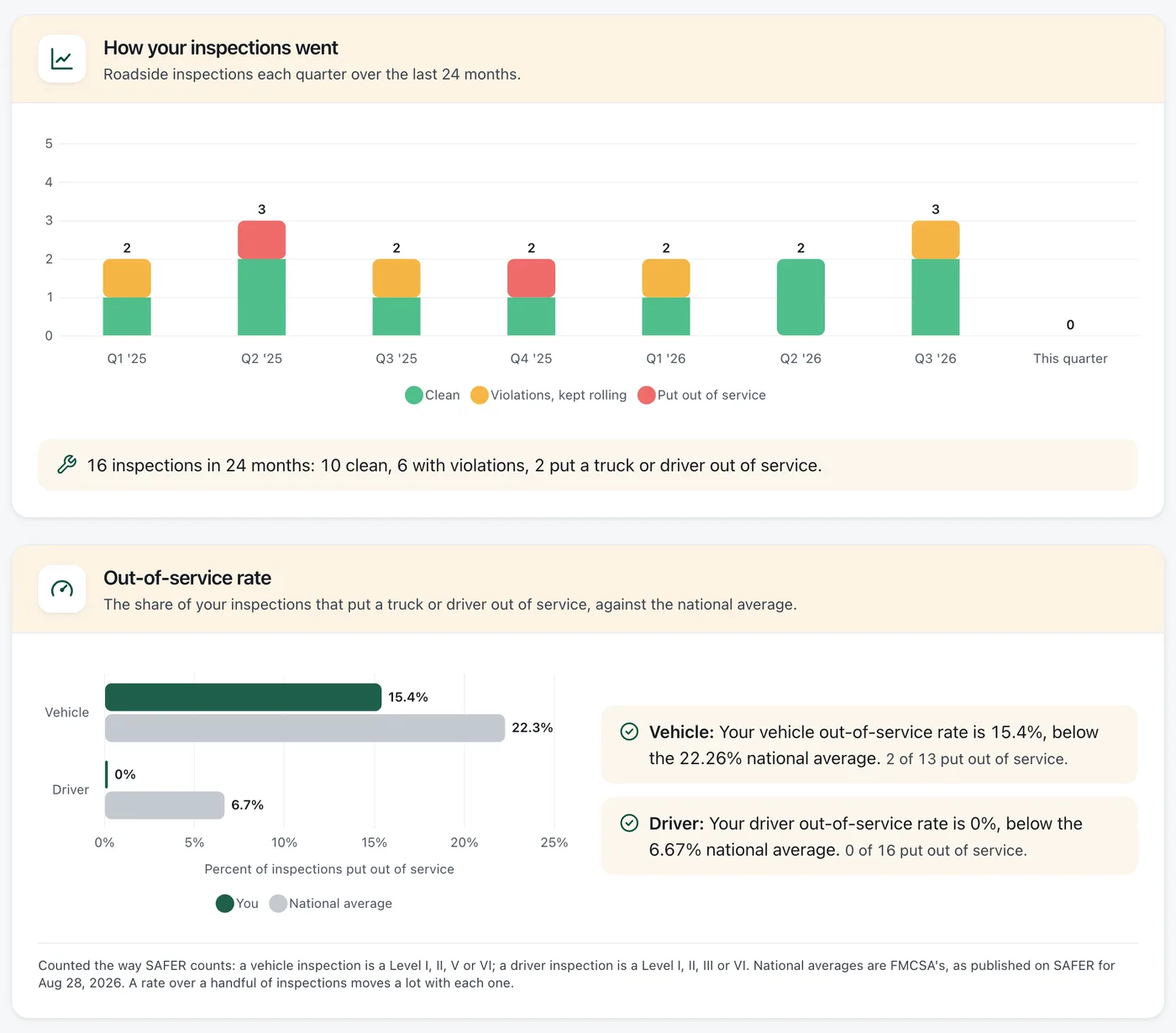
Medical cards, CDLs, inspections, permits and filings, sorted soonest first, each next to the rule that sets it. Beside the list, your FMCSA record shows your roadside inspections and out-of-service rates against the national average.
Driver, truck and company dates
Medical cards, CDLs, the yearly MVR review, Clearinghouse queries, the annual inspection, MCS-150, UCR, 2290, IFTA and IRP. 40 federal rules for every state, plus 13 California rules if you run there.
Add a date from a photo
A medical card, a CDL, a registration. FleetView AI reads the names and dates and marks what it filled in, and you confirm before it saves.
Your driver sends the new card
When your driver renews a medical card or CDL, he takes a photo of it. Nothing changes until your office accepts it, and the old date is kept with who changed it and when.
Record changes that could stop a truck
FleetView checks your FMCSA record about once a day and keeps a dated copy. If a change could stop a truck, like an out-of-service order or insurance withdrawn, you get an email the day FleetView sees it.
More on the same list
- What an inspection today could cost
- The most you could be fined for what is overdue or missing, from the fine each rule lists. Items with no set fine are counted separately, never as $0.
- Your own reminders
- Insurance renewals, truck payments, a lease. Add it once, say how often it repeats, and it shows up in the same list and email.
- Time records for local drivers
- For drivers who stay within 150 air-miles. It stays off until you turn it on.
Every copy says when FleetView checked it, and the page links to the FMCSA source so anyone can check it. We are not affiliated with the FMCSA or the U.S. DOT.
Roadside, trucks and crashes
Be ready when your driver is pulled over
Your driver has the truck papers, the daily truck check and the inspection report on his phone. You see what each truck still needs.
Pulled over? Your driver sends you the report
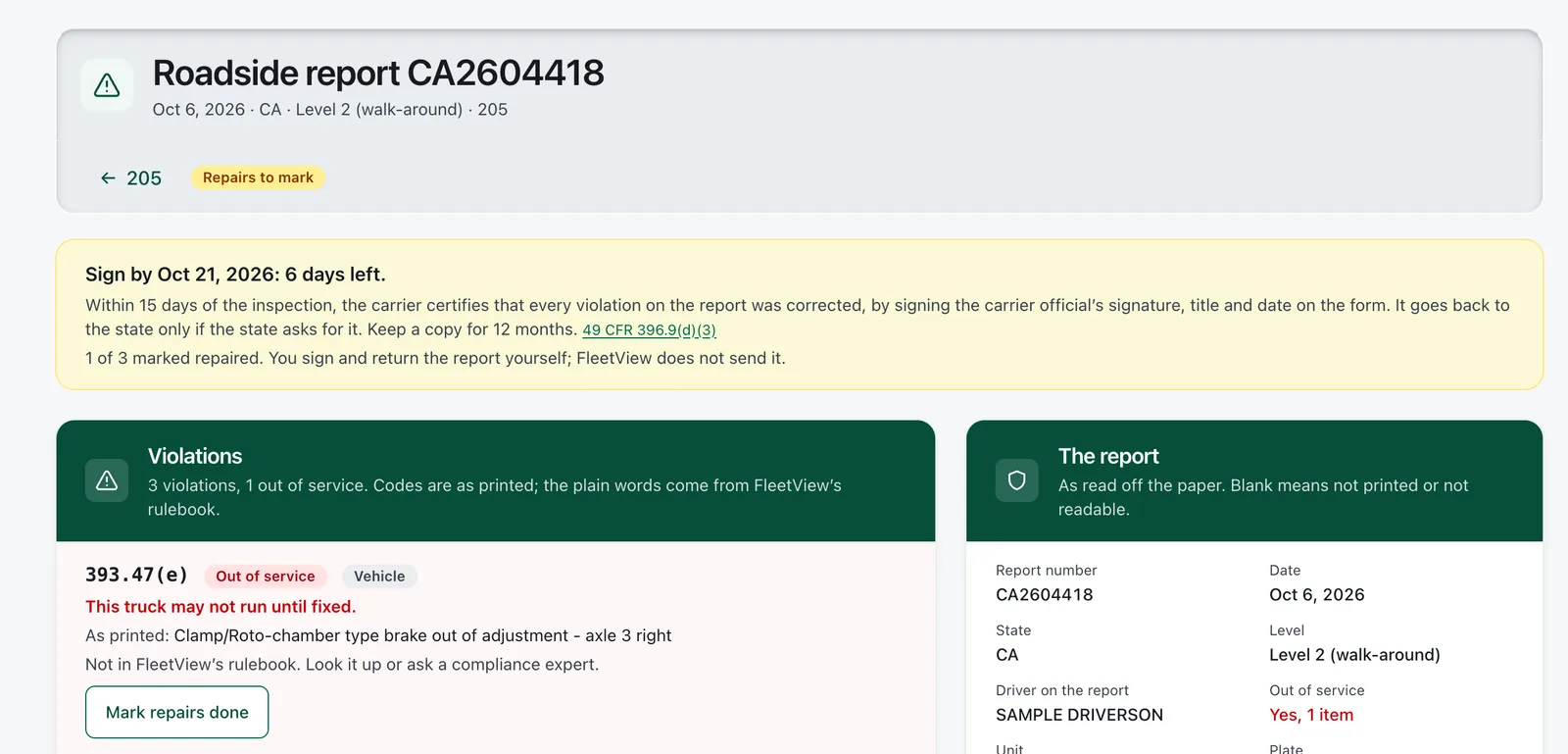
Your driver presses I was inspected and takes a photo of the officer’s report. You see it the same day, with a 15-day countdown to fix the problems and sign the report.
The daily truck check
Your driver presses All good, or Something’s wrong and adds a photo. A brake, steering, tire or coupling problem keeps the truck off loads until the repair is signed.
Truck papers behind one button
Registration, IFTA license, insurance card, annual inspection and permits, behind one Show officer button on your driver’s phone. Keep the paper copies in the truck too.
Clear steps after a crash
Your driver’s phone gives one step at a time. Your accident register keeps each crash for 3 years, next to the crashes on your FMCSA record. You decide whether it is DOT-recordable.
Inspections matched to your trucks
When a roadside inspection matches one of your trucks by VIN or plate, you see it under that truck, with what the officer wrote and the rule number.
Inspection dates for every truck and trailer
Annual and roadside inspections and, for California fleets, the 90-day BIT inspection and Clean Truck Check, each with its date and paper.
Proof links
Show each person only the papers they need
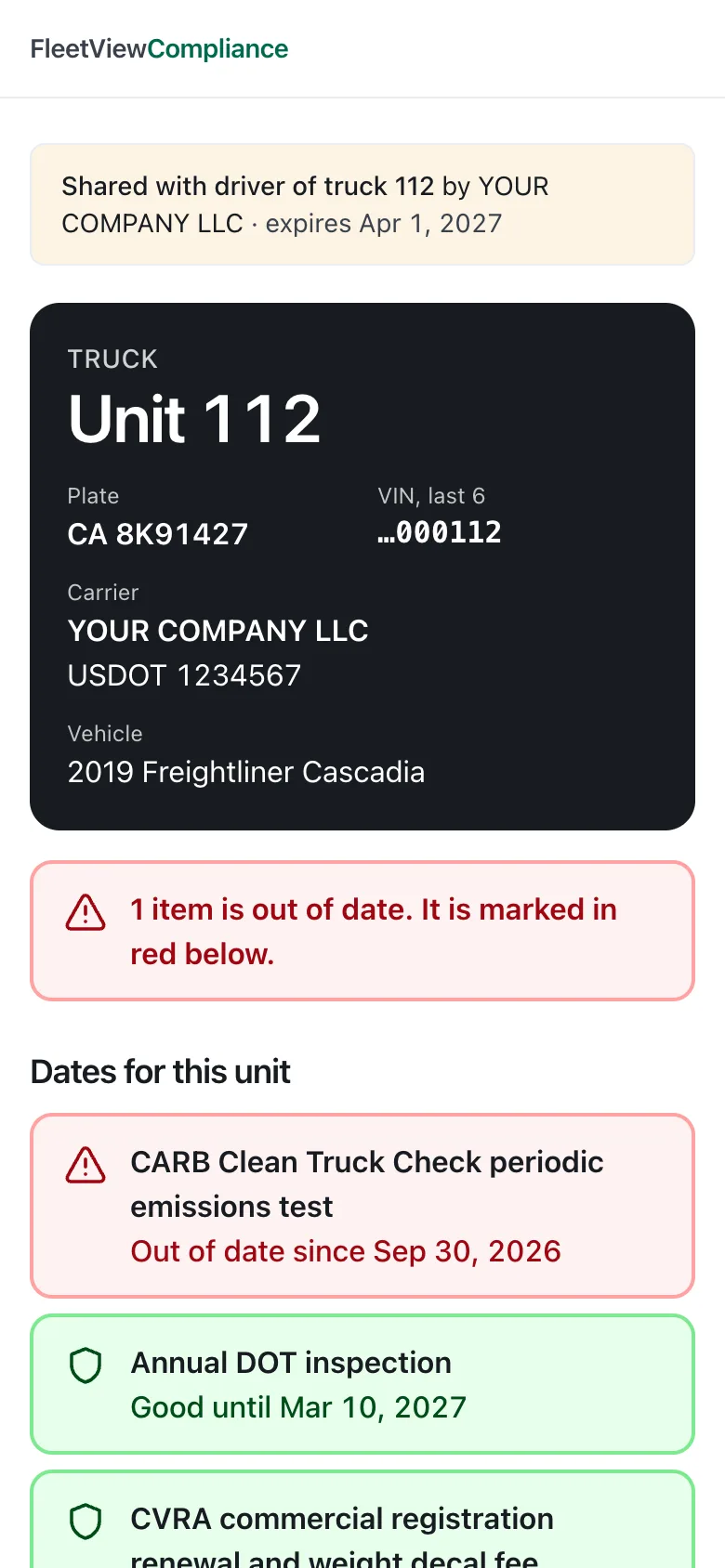
Each kind of link is made for one reader. Pick the reader, and the link opens on any phone or computer with no login. Each link ends on its own date, you can turn it off sooner, and you see when it was opened.
Broker packet link
A broker
“Are you set up and insured?”
It shows: Your federal record as of FleetView’s last check: authority, insurance filed with FMCSA, process agent (BOC-3), out-of-service orders, safety rating, inspections and crashes for 24 months, fleet size.
Never: No driver names, no driver details, no VINs, no documents.
Lasts up to 90 days.
In the cab link
An officer at the roadside
“Show me the papers for this truck.”
It shows: One truck: unit number, plate, last 6 of the VIN, its dates (annual inspection and the rest) and the papers you uploaded for it, full size. While a load is on the road on this truck: from and to, what and how much, the driver’s name, the next stop and the bill of lading.
Never: Nothing about any other truck. Never a load’s rate, broker, customer or contacts. A driver’s name only while their load is on this truck.
Lasts up to 365 days.
Insurance link
Your insurance agent
“Send me what I need for a quote or a renewal.”
It shows: Your company and how it runs, the cover you entered, your drivers and trucks as a list, your safety record, and your certificate and loss runs.
Never: No driving-record (MVR) reports, no drug or alcohol results, no Clearinghouse results and no W-9. Birth dates and full license numbers only if you choose to include them.
Lasts up to 30 days.
Auditor link
A DOT auditor
“Show me your files, in order.”
It shows: The whole binder in the order an auditor works: what would fail or be cited first, then each driver’s qualification file with its papers, the drug and alcohol program, every truck’s inspections and maintenance papers, and the accident register.
Never: No drug or alcohol test results, no Clearinghouse results and no driving-record (MVR) reports. Birth dates and full license numbers only if you choose to include them.
Lasts up to 30 days.
There is also a Driver file link: one driver’s qualification file, in the order 49 CFR 391.51 lists it, for up to 30 days. You can preview an Insurance or Auditor link before you send it.
At a roadside stop the officer decides what to accept. A link supports the papers in the truck. It does not replace them.
Alerts
One email each morning. A text only when it cannot wait.
Texts stay off until you turn them on. Then a text comes for a date that is overdue or due tomorrow, and for urgent news on your FMCSA record, like a revoked authority.
Deadlines and record changes, together
The morning email puts what is coming due and the smaller changes on your FMCSA record under their own headings.
You choose when, and who
For each kind of deadline, choose how many days ahead to hear about it and who gets the email. Medical cards can go to your office. Authority problems can go to you.
Quiet at night
Nothing arrives at 2 a.m. about a renewal due next month, and every date and time shows in your own time zone. Urgent items still come through, and you can see which ones.
Snooze, or turn a rule off
Snooze an item you already took care of. Turn a rule’s reminders off for one driver or the whole fleet. FleetView keeps tracking the date and records what you turned off and when.
Every screen on this page comes in one plan.
The bill counts the trucks you run. Drivers and office users add nothing to it. There are no extra modules to buy.
Where we stop
What we do not do
These are the limits, stated plainly, so you know them before you start.
No GPS tracker
No tracking box and no tracking in the background. Your driver’s location is sent only when your driver presses a button, and only if your driver turns on Share my location.
Not an ELD, and we never edit logs
Your drivers log on the device they use now. Add each truck’s ELD ID, and FleetView checks it every week against FMCSA’s list of revoked devices. If your driver presses My logging device broke, you get the written notice and an 8-day countdown. The trip plan is only a plan. The logging device is the legal record.
We never file anything for you
The IFTA return, the MCS-150 and the roadside report are yours to sign and send. We are not a law firm.
We cannot run your Clearinghouse queries
The rules do not let a service use your login. FleetView shows when your queries are due and keeps the proof that you ran them.
We do not collect your money
We do not bill the broker or collect detention for you. You add the charge, you send the invoice, and the broker decides whether to pay.
State rules outside California
FleetView has no state rules for any state but California. A permit or filing from another state is not on your list.
30 days free. No card needed. Cancel anytime.